What Is an RS-232 Sniffer?
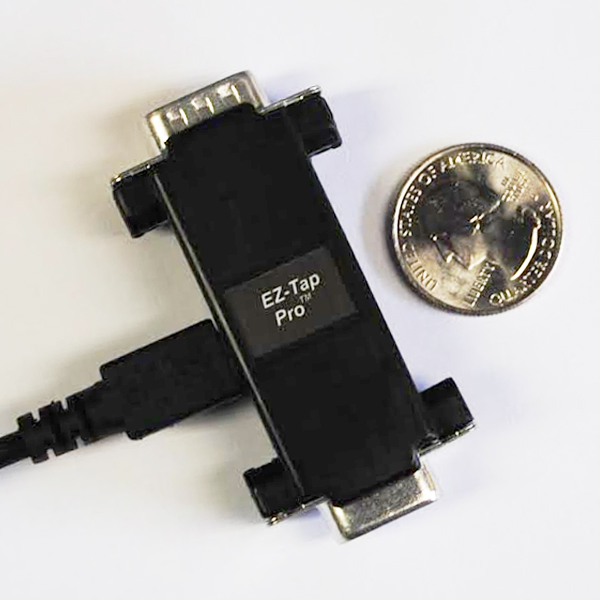
An RS-232 sniffer is a hardware or software tool that captures the data flowing between two RS-232 devices without interrupting their connection. Engineers use sniffers to debug serial communication, reverse-engineer protocols, validate firmware, and diagnose intermittent failures in deployed systems.
This guide covers what RS-232 sniffers do, how passive hardware taps work, what to capture, common use cases, and what to look for when choosing one.
How Does an RS-232 Sniffer Work?
An RS-232 sniffer sits between two serial devices and observes the data passing between them. The key word is observes — a properly designed sniffer doesn't inject signals, doesn't add electrical load, and doesn't show up to either device. The two devices communicate as if the sniffer isn't there.
This is fundamentally different from how most "monitoring" software works. A software monitor running on a PC can only see traffic going to or from that PC. A hardware sniffer sees everything on the wire — including device-to-device traffic that never touches a PC.
Passive vs active sniffers
The most important distinction in RS-232 sniffing is passive vs active:
- Passive sniffers tap the signal lines and mirror traffic to a host PC without modifying them. They don't break the connection between the two devices under test. Production-safe.
- Active sniffers intercept the signal, decode it, and re-transmit it. This can introduce latency or modify timing, which makes them unsuitable for debugging timing-sensitive or production systems.
For nearly every debugging scenario, a passive sniffer is the right choice. The only time an active sniffer makes sense is when you specifically need to modify or inject traffic during testing.
What Can You Capture with an RS-232 Sniffer?
A capable RS-232 sniffer captures four things:
- Data bytes in both directions simultaneously — what each device sent, and in what order. This is the minimum.
- Handshake-line state changes — DTR, DSR, RTS, CTS, DCD, and RI transitions, with timing. Many flow-control bugs are invisible without this. See RS-232 handshaking explained for details on what each line does.
- Precise timestamps — ideally microsecond resolution from hardware. Software sniffers deliver millisecond precision at best, which isn't enough for protocols with strict inter-byte timing.
- Voltage-level events — some sniffers also flag voltage transitions and electrical anomalies, useful when diagnosing noise or marginal signal quality.
Common Use Cases for RS-232 Sniffing
- Firmware debugging — confirm your device is sending and receiving the right bytes at the right time
- Protocol reverse engineering — learn how a third-party device communicates so you can integrate with it
- Production fault diagnosis — catch intermittent failures in deployed equipment without modifying the system
- Integration testing — verify two devices from different vendors actually communicate correctly
- Compliance documentation — capture proof of correct behavior for certification or audit
- Reverse-engineering legacy systems — document undocumented protocols on equipment older than the engineers maintaining it
What to Look For in an RS-232 Sniffer
Not all RS-232 sniffers are created equal. When evaluating options, check for:
- Passive operation — if it modifies signal timing or voltage, it's not safe for production use
- Maximum baud rate — older sniffers cap at 115,200 bps. Modern industrial systems often run at 921,600 bps or higher. Some specialty applications hit 1 Mbps or 2 Mbps.
- Hardware timestamps — software-based timestamps drift with OS scheduling. Hardware microsecond timestamps don't.
- Handshake-line capture — if it can't see DTR, DSR, RTS, CTS, DCD, and RI transitions, it'll miss most flow-control bugs.
- Bidirectional capture — both sides of the conversation, simultaneously, with timing relationships preserved.
- Software compatibility — works with tools you already use (EZ-View, Docklight, custom .DLL applications via Windows API).
- Multi-protocol support — if you also work with RS-422 or RS-485, a multi-protocol tap saves having to buy separate hardware.
Stratus Engineering's RS-232 Sniffers
Stratus Engineering builds hardware passive taps used by engineering teams at Microsoft, Motorola, Raytheon, Lockheed Martin, and dozens of other companies worldwide. All three are fully passive — safe for production systems — and include free EZ-View monitoring software.
- EZ-Tap — entry-level RS-232 sniffer for basic monitoring up to 230,400 bps. Best for short-baud-rate work and budget-conscious deployments.
- EZ-Tap Pro — adds microsecond hardware time-tagging, full handshake-line capture, and baud rates up to 1 Mbps. The right choice when timing matters.
- Versa-Tap — multi-protocol sniffer supporting RS-232, RS-422, RS-485, and 3.3V/5V TTL. Baud rates up to 2 Mbps, plus synchronous HDLC support.
Not sure which one fits? Compare all three side by side.
Further Reading
- What Is a Serial Port Monitor? Hardware vs Software — broader guide covering both software and hardware monitors
- How to Debug RS-232 Communication Issues — a layered diagnostic workflow
- 5 Common Serial Port Problems — symptom-first troubleshooting reference
- RS-232 9-Pin Pinout Reference — standard signal assignments
- RS-232 Handshaking Explained — DTR, DSR, RTS, CTS, DCD, RI
Questions on a specific application? Email us or call (858) 663-1841.