
What Is a Serial Port Monitor? A Practical Guide for RS-232, RS-422 & RS-485
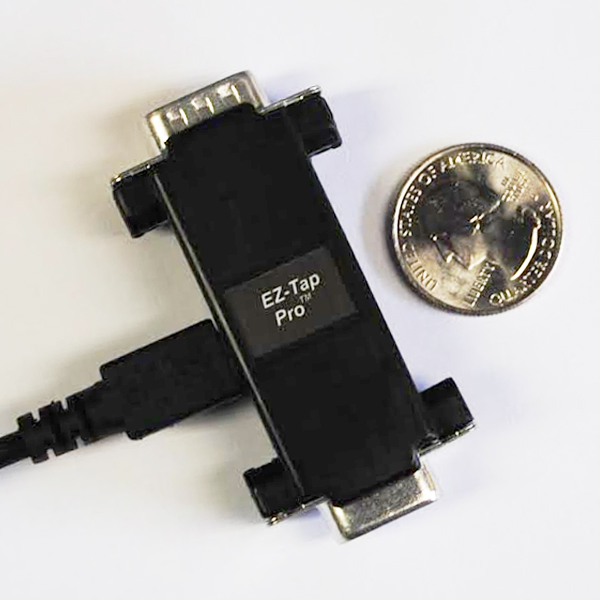
A serial port monitor captures and displays the data flowing between two serial devices, without interrupting their connection, so engineers can debug, log, or analyze the communication. Whether you're chasing a stubborn handshake bug, validating a Modbus implementation, or proving out a new firmware build, a serial port monitor is the tool that shows you what's actually on the wire.
This guide covers what serial port monitors do, the difference between software and hardware monitors, when you need each, and how to choose the right one for your application. For a side-by-side look at specific tools, see our roundup of the best serial port monitors, software and hardware compared.
What Does a Serial Port Monitor Do?
At its core, a serial port monitor does three things:
- Captures all data passing between two serial devices in real time.
- Displays the data in a readable format (ASCII, hex, decimal, or binary) with timestamps.
- Logs the captured traffic so it can be analyzed, shared with a colleague, or replayed for debugging later.
Better monitors also show the state of the handshake lines (DTR, DSR, RTS, CTS, DCD, RI), capture data in both directions simultaneously, and provide microsecond-precise timestamps for timing-sensitive analysis.
Software vs Hardware Serial Port Monitors
There are two fundamentally different approaches to monitoring serial traffic. Choosing the wrong one is the single biggest mistake engineers make.
Software serial port monitors
Software monitors run on a PC and intercept traffic at the operating system level. They sit between the application and the device driver, capturing what the application sends and receives.
Pros: Free or low-cost. No additional hardware required. Easy to set up.
Cons: Can only see traffic going to or from the PC they're installed on. Can't monitor device-to-device communication that doesn't involve the PC. Subject to OS scheduling jitter, so timestamps are unreliable for high-speed or latency-sensitive analysis. Driver conflicts are common.
Use software monitors when you control both sides of the conversation and one of them is the PC running the monitor.
Hardware passive taps
A hardware passive tap is a physical device that sits inline between two serial devices and mirrors all traffic, in both directions, to a PC for capture. Critically, the tap is passive: it doesn't inject signals, doesn't add delay, and doesn't appear to either device. The two devices communicate as if the tap isn't there.
Pros: Sees everything on the wire, including device-to-device traffic that never touches a PC. Hardware-level timestamps with microsecond precision. No driver conflicts. Works with production systems without modifying firmware or interrupting service. Captures handshake-line state changes alongside data.
Cons: Requires a small hardware purchase. Requires physical access to the cable between the two devices.
Use a hardware passive tap when you're debugging device-to-device communication, when timing matters, when you can't modify the system under test, or when software monitoring isn't enough.
When Do You Need a Serial Port Monitor?
The most common use cases:
- Firmware development and debugging: verify that your device is sending and receiving the right data at the right time
- Protocol analysis: reverse-engineer or validate Modbus, NMEA, DMX, custom serial protocols, and proprietary device communication
- Integration testing: confirm that two devices from different vendors actually talk to each other correctly
- Production troubleshooting: diagnose intermittent failures in deployed equipment without taking the system offline
- Compliance and certification: capture proof of correct behavior for regulatory documentation
- Training and education: show students or junior engineers exactly what's happening on a serial link
What to Look For in a Serial Port Monitor
Not all serial port monitors are created equal. When evaluating options, check for:
- Protocol support: does it handle RS-232 only, or also RS-422, RS-485, and TTL voltage levels?
- Maximum baud rate: will it keep up with your application? Modern industrial systems often run at 921,600 bps or higher.
- Timestamp resolution: software monitors deliver millisecond accuracy at best. Hardware taps deliver microsecond precision, which matters for timing-sensitive protocols.
- Handshake-line visibility: can it capture state changes on DTR, DSR, RTS, CTS, DCD, and RI? Many flow-control bugs are invisible without this.
- Bidirectional capture: can it show both sides of the conversation simultaneously, with the exact timing relationship between request and response?
- Software compatibility: does it work with the tools you already use (EZ-View, Docklight, custom .DLL applications)?
- Passive vs active: passive devices don't disrupt the link being monitored. Active devices can.
Industries That Rely on Serial Port Monitors
Serial communication is everywhere, not just in legacy hardware. Modern engineering teams across these industries use serial port monitors daily:
- Industrial automation and factory control
- Building automation (HVAC, lighting, access control)
- Aerospace and defense
- Medical devices
- Test and measurement instrumentation
- Telecommunications
- Consumer electronics
- Embedded systems and IoT
- Marine and GPS equipment
Stratus Engineering's Serial Port Monitors
Stratus Engineering builds hardware passive taps used by engineering teams at Microsoft, Motorola, Raytheon, Lockheed Martin, and dozens of other companies worldwide. Three models cover the range of serial monitoring needs:
- EZ-Tap: entry-level RS-232 passive tap for basic monitoring up to 230,400 bps.
- EZ-Tap Pro: adds microsecond hardware time-tagging, full handshake-line capture, and baud rates up to 1 Mbps.
- Versa-Tap: multi-protocol passive tap supporting RS-232, RS-422, RS-485, and TTL, with HDLC analysis and baud rates up to 2 Mbps.
Not sure which one fits your project? Compare all three side by side.
All three include free EZ-View monitoring software and work with Docklight and other third-party serial monitoring tools.
Further Reading
- How to Debug RS-232 Communication Issues: a layered diagnostic workflow
- 5 Common Serial Port Problems: symptom-first troubleshooting guide
- RS-232 9-Pin Pinout Reference: standard signal assignments
- RS-232 Handshaking Explained: DTR, DSR, RTS, CTS, DCD, RI
Questions on a specific application? Email us or call (858) 663-1841.